Your team
Who works at your business, with which roles and at which locations, and the invitations still pending.
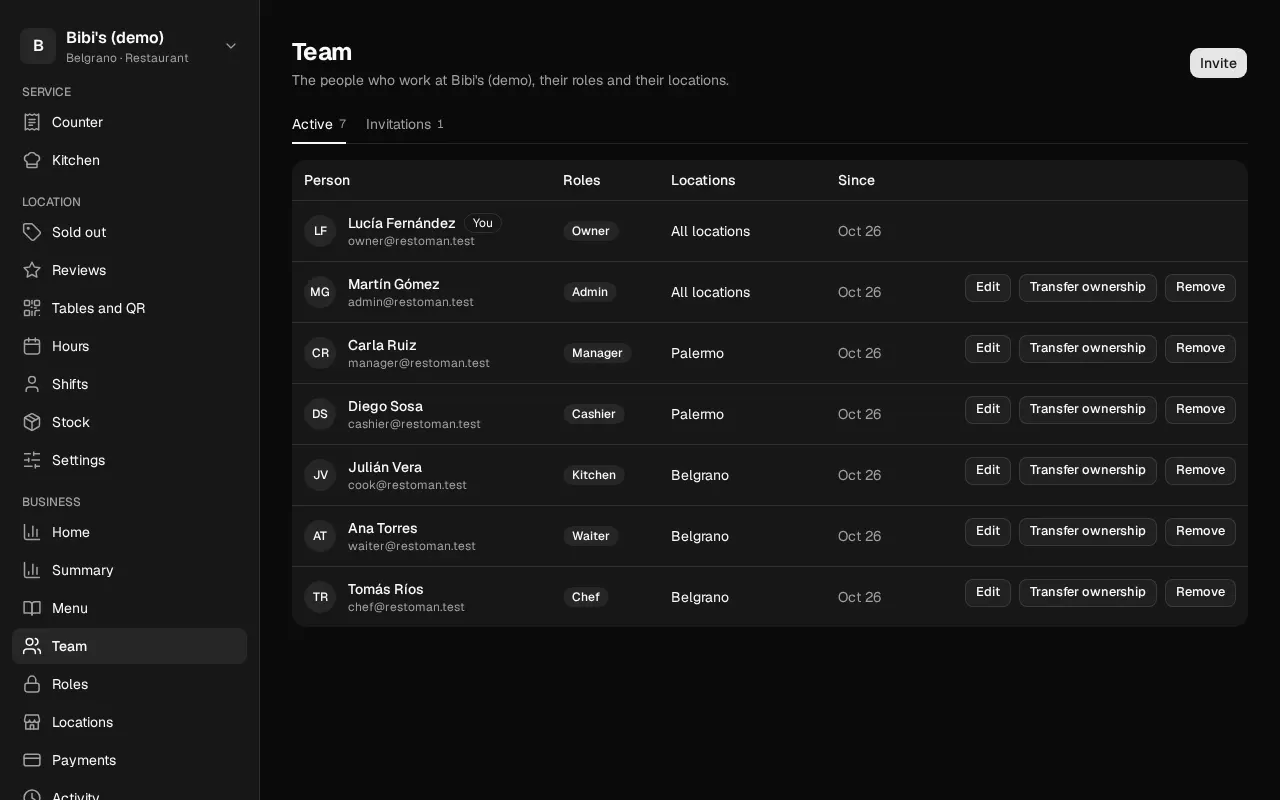
In Team you see the people in the business and the invitations you've sent.
Who can: the owner and the admins. The rest of the team doesn't see this section.
Active
Each person with their Roles, their Locations ("All locations" or the ones assigned to them; archived ones are marked) and since when they've been there. Your row says You.
Depending on who you are, each row shows:
- Edit: change their roles, their location access and their locations (Change someone's roles).
- Remove: take them out of the business (Remove someone or leave).
- Transfer ownership: only for the owner (Transfer ownership).
- Leave the business: in your own row, for everyone except the owner.
Invitations
The invitations nobody has accepted yet: the email, the roles, the locations, who sent it and when it expires. To send one, tap Invite (Invite someone).
To cancel one:
- Tap Cancel in its row.
- Confirm with Cancel the invitation. The link in the email stops working.
An admin can't cancel another admin's invitation: the owner does that.
The rules of rank
- The owner can change and remove anyone.
- An admin can change and remove anyone who isn't an admin or the owner.
- Nobody changes their own roles: they ask someone else who runs the business.
- Nobody changes or removes the owner: ownership only changes hands through a transfer.
If you see "You don't have access to this business's team"
Your role doesn't include the team. If you need it, ask the owner or an admin.